Usage
Create & manage hierarchical data
This example employs a template to generate sample data:
from indexia.eidola import Templates

db = 'test.db'
generator = Templates(db)
generator.show_templates()
objects = generator.build_template('philosophy')
The build_template method of eidola.Templates creates & populates
several database tables with hierarchical relationships. The hierarchy of
tables in 'philosophy' & other available templates is illustrated by the
show_templates method. To generate tables & data from scratch, use the
add_creator & add_creature methods of indexia.Indexia:
from indexia.indexia import Indexia

with Indexia(db) as ix:
    cnxn = ix.open_cnxn(ix.db)

    homer = ix.add_creator(
        cnxn=cnxn,
        genus='poets',
        trait='name',
        expr='Homer'
    )

    iliad = ix.add_creature(
        cnxn=cnxn,
        genus='poets',
        creator=homer,
        species='epics',
        trait='title',
        expr='The Iliad'
    )
Once objects have been generated, they can be updated & managed with
indexia.Indexia:
from indexia.indexia import Indexia

philosophers = objects['philosophers']
aristotle = philosophers[philosophers.name == 'Aristotle']

with Indexia(db) as ix:
    cnxn = ix.open_cnxn(ix.db)

    works_of_aristotle = ix.get_creatures(
        cnxn=cnxn,
        genus='philosophers',
        creator=aristotle
    )

    table, data = works_of_aristotle[0]
    on_the_soul = data[data.title == 'On the Soul']
    work_id = on_the_soul.id.values[0]

    works_deleted = ix.delete(
        cnxn=cnxn,
        species=table,
        entity_id=work_id
    )

    assert(works_deleted == 1)

    on_dreams = ix.add_creature(
        cnxn=cnxn,
        genus='philosophers',
        creator=aristotle,
        species='works',
        trait='title',
        expr='On Dreams'
    )

    dreams = ix.add_creature(
        cnxn=cnxn,
        genus='works',
        creator=on_dreams,
        species='topics',
        trait='name',
        expr='dreams'
    )
Inpect & display data
To view the full data hierarchy under a given set of creator entities, create
a dataframe using schemata.Corpus:
from indexia.schemata import Corpus

corpus = Corpus(
    db=db,
    genus='philosophers',
    creators=philosophers
).assemble()
Relationships between indexia objects can be visualized as a network graph
using schemata.Diktua:
from indexia.schemata import Diktua

works = corpus[corpus.species == 'works']

diktua = Diktua(
    corpus=works,
    as_nodes='expression', # nodes represent work titles
    as_edges='creator_id'  # edges represent shared authorship
)

diktua.style_nodes()
diktua.plot(plot_path='diktua.html')
Open diktua.html in a web browser to load the interactive network graph.
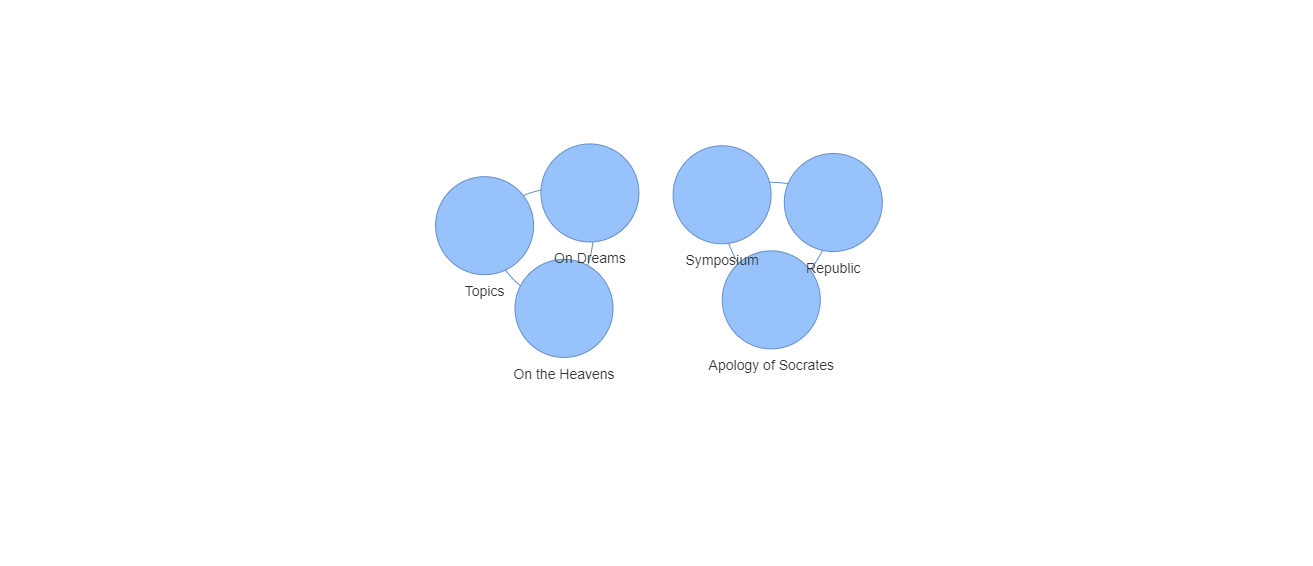
Note: schemata.Diktua uses pyvis for plotting, which can be slow
for large or well-connected graphs. Performance improvements may be made in
future releases.
indexia data can also be represented as XML using schemata.Dendron:
from indexia.schemata import Dendron

dendron = Dendron(db)

image = dendron.render_image(
    genus='philosophers',
    creators=philosophers
)

dendron.write_image(
    image,
    file_path='dendron.xml',
    open_browser=True
)
The render_image method of schemata.Dendron creates an XML tree of
indexia data, which can be saved & opened in a browser window with
write_image. The tree created for the 'philosophy' template data
looks like this:
<root>
    <philosophers id="1" name="Plato">
        <works id="1" title="Apology of Socrates" philosophers_id="1">
            <topics id="1" name="civics" works_id="1"/>
        </works>
        <works id="2" title="Symposium" philosophers_id="1">
            <topics id="2" name="love" works_id="2"/>
        </works>
        <works id="3" title="Republic" philosophers_id="1">
            <topics id="3" name="civics" works_id="3"/>
        </works>
    </philosophers>
    <philosophers id="2" name="Aristotle">
        <works id="4" title="On the Heavens" philosophers_id="2">
            <topics id="4" name="cosmology" works_id="4"/>
        </works>
        <works id="5" title="Topics" philosophers_id="2">
            <topics id="5" name="logic" works_id="5"/>
        </works>
        <works id="7" title="On Dreams" philosophers_id="2">
            <topics id="7" name="dreams" works_id="7"/>
        </works>
    </philosophers>
</root>
Custom workflows
The methods of indexia modules can be wrapped in other functions to create
workflows for your projects. Below is an example of a script to add cards to a
Zettelkasten project. Running this script from a command line tool gives a
minimalist interface for creating project data. Other frameworks & applications
can be leveraged to make full-fledged applications.
from indexia.indexia import Indexia


def get_library(ix, cnxn, scribe, libronym):
    _, libraries = ix.get_creatures(cnxn, 'scribes', scribe)[0]
    library = libraries[libraries.libronym == libronym]

    return library

def add_card(ix, cnxn):
    pseudonym = input('enter scribe pseudonym: ')
    libronym = input('enter library libronym: ')
    created = input('enter card datetime: ')
    keywords = input('enter semi-colon-separated keywords: ')
    keywords = keywords.split(';')

    scribe = ix.get_by_trait(cnxn, 'scribes', pseudonym)
    library = get_library(ix, cnxn, scribe, libronym)

    card = ix.add_creature(
        cnxn, 'libraries', library, 'cards', 'created', created
    )

    for k in keywords:
        ix.add_creature(
            cnxn, 'cards', card, 'logonyms', 'logonym', k
        )

    return card

def main():
    db = 'indexia.db'

    with Indexia(db) as ix:
        cnxn = ix.open_cnxn(db)
        card = add_card(ix, cnxn)

    return card


if __name__ == '__main__':
    card = main()